Most home offices tend to swing between two dysfunctional extremes. On one side sits the utilitarian cubicle replica, dominated by tangle-prone black cords, harsh overhead lighting, and sterile plastic accessories that feel completely detached from the warmth of the home. On the other lies the curated social media showroom: an open desk dressed in linen notebooks and brass pencil holders that looks stunning in photographs but falls apart the second real work requires dual monitors, reliable storage, and hours of seated focus.
A truly successful home workspace rejects both compromises. Interior design and cognitive performance are closely linked; your physical surroundings directly influence mental stamina, distraction levels, and creative output. Designing a home office that is both visually refined and deeply practical comes down to intentional spatial planning, tactile comfort, and deliberate environmental control.
Establishing the Command Position and Visual Hierarchy
Where you position your desk dictates the psychological tone of the entire room. Pushing a desk flat against a blank wall is often the default choice to maximize floor space, but staring at drywall for eight hours a day induces cognitive fatigue and claustrophobia.
Whenever room dimensions allow, arrange the room in the command position. Position your desk so your back is near a solid wall or built-in bookshelf, with an open view facing the room’s main entrance. This orientation taps into a basic human instinct for security, eliminating the subtle unease of having your back exposed to foot traffic or opening doors. It also immediately frames your workspace as a place of authority and purpose.
Pay close attention to what sits in your primary line of sight when seated. The wall or view directly past your monitor should be visually restful. If your desk must face a wall, avoid cluttering that space with corkboards covered in overdue receipts or loose sticky notes. Instead, mount a large piece of textured canvas art, install warm wood slat paneling, or hang floating shelves styled with a few ceramics and books. Give your eyes a clean, uncluttered horizon to rest on during screen breaks.
Layered Lighting to Eliminate Strain and Shift Moods
Relying solely on a single flush-mount ceiling fixture is a guaranteed recipe for eye fatigue and afternoon headaches. High-performance office design requires a layered lighting scheme combining ambient, task, and accent light sources.
Start with your task light. An adjustable desk lamp with a weighted base and an articulated arm lets you cast direct light across reading material and notebooks without bouncing glare off computer monitors. Choose bulbs calibrated between 3000K and 4000K on the Kelvin scale. This neutral white spectrum mirrors crisp morning daylight, encouraging mental alertness without carrying the cold, clinical blue undertones of commercial fixtures.
Ambient and accent lighting soften the contrast between your bright computer display and the surrounding room, which prevents rapid eye fatigue. Place a ceramic table lamp with a textured linen shade on a nearby credenza, or install warm LED uplighting along the top of a bookcase. These secondary sources fill dark corners, wash the room in soft light, and eliminate harsh shadows during evening hours.
Managing Natural Light and Screen Glare
Natural sunlight is the single most effective mood booster in a workspace, but uncontrolled light can render computer screens unreadable. Never position your desk so a monitor sits directly in front of an unshaded, south-facing window, as the extreme backlight will force your pupils to constantly dilate and contract.
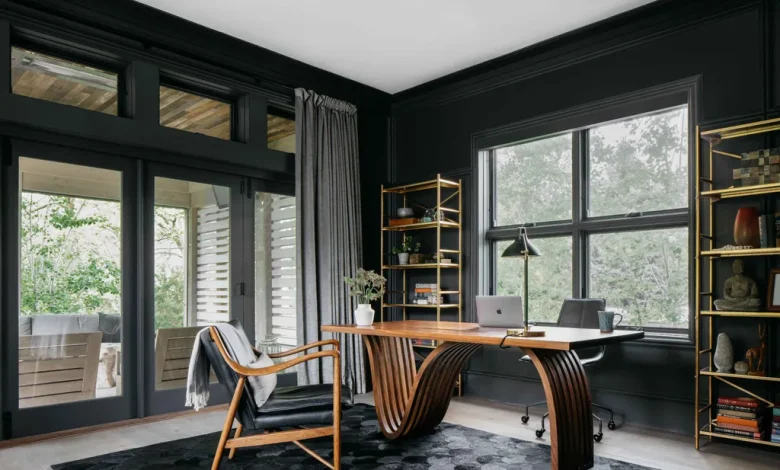
Similarly, placing your back directly to an exposed window casts harsh reflections across glossy screens. Position your desk perpendicular to windows whenever possible. Dress windows with linen drapes paired with solar roller shades. This combination diffuses harsh midday glare into soft, indirect ambient light while maintaining natural temperature control.
Concealing the Tech: The Foundation of Office Styling
Nothing ruins high-end decor faster than a chaotic waterfall of black cables pooling beneath a desk. A clean workspace begins with intentional cable architecture, which creates the visual breathing room necessary for decorative elements to shine.
-
Mount power strips to the desk underside: Screw a heavy-duty, surge-protected power strip directly to the underside of the desktop or tuck it inside an under-desk steel wire raceway. Every monitor, computer charger, and desktop light should plug in beneath the surface.
-
Route cables with split-tubing or spine managers: Run a single braided fabric cable sleeve or articulated cable spine from the underside of the desk down to the wall outlet. Consolidating six cords into one neat run instantly transforms the silhouette of the desk.
-
Integrate wireless charging surfaces: Replace bulky plastic charging blocks with wireless charging pads wrapped in leather, wood grain, or stone that rest naturally alongside standard desk trays.
-
Choose closed credenzas over open shelving for hardware: Printers, network routers, external backup drives, and reams of paper belong behind solid cabinet doors. A mid-century walnut sideboard or a painted shaker-style cabinet keeps functional equipment fully accessible while hiding visual noise.
Balancing Hard Surfaces with Acoustic Softening
Modern electronics, hardwood flooring, and drywall turn home offices into echo chambers, which degrades focus and sounds hollow on conference calls. Introducing varied textiles solves acoustic issues while adding tactile sophistication to the room.
Anchor the main seating area with a dense wool or high-pile vintage rug that extends well beyond the desk and rolling chair perimeter. Beyond deadening footfall and chair movement, a large area rug visually grounds the workstation, carving out a defined zone within a larger bedroom or living area.
Layer the space further with floor-to-ceiling fabric window treatments, an upholstered accent chair in the corner, or textured fabric wall coverings. Even a cork or linen-wrapped memo board acts as a sound-absorbing acoustic baffle when mounted strategically across from a desk.
Curating Color, Biophilic Accents, and Tactile Details
The finishing touches should cater to your senses, reinforcing a steady rhythm of calm productivity throughout the day.
Steer clear of aggressive, high-saturation primaries like bright reds or neon yellows, which overstimulate the nervous system during long stretches of focus. Instead, build your palette around grounded, earthy tones. Subdued sage greens, warm clay terracottas, warm oatmeals, and muted slate blues ground the room and reduce stress.
Integrate living greenery to soften the clean, geometric lines of monitors and shelving. Plants do more than purify indoor air; interacting with nature reduces cortisol and restores cognitive focus. Choose hardy, low-maintenance indoor varieties that thrive in indirect light:
-
ZZ Plants (Zamioculcas zamiifolia): Glossy, architectural leaves that tolerate neglected watering and low light corners.
-
Snake Plants (Sansevieria): Upright structural foliage that adds height beside filing cabinets or desks.
-
Pothos: Flowing vines that look exceptional trailing off the edge of a high bookshelf or wall bracket.
Finally, prioritize tactile quality on items you physically handle daily. Trade cheap plastic desk organizers for heavy cast-iron trays, full-grain leather desk pads, ceramic pen holders, and solid brass paperweights. These small, deliberate details transform routine work from an endurance test into an engaging, deliberate ritual.
A stylish home office is never an afterthought of thrown-together furniture or decorative trends. By respecting the functional demands of your workflow and outfitting the room with tailored lighting, smart concealment, and enduring materials, you create an environment that honors both your profession and your personal aesthetic.